Everything under the hood
The TradingView to MT5 bridge that manages the whole trade.
Multi-TP, trailing stops, breakeven, and proof of every delivery.
PineHook executes your TradingView alerts on MT5 and runs the exit plan you wrote into them, from partial closes to the final target.
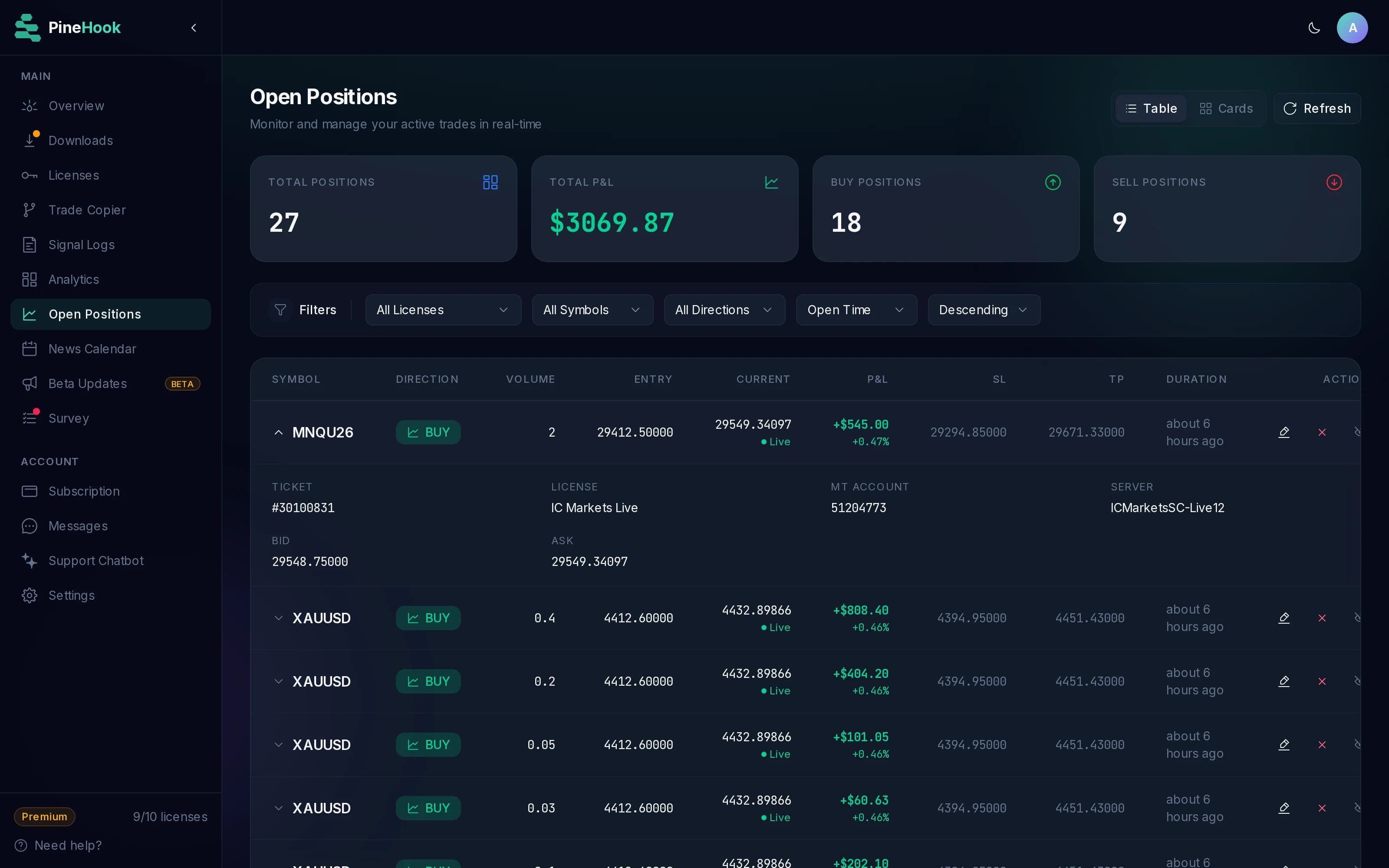
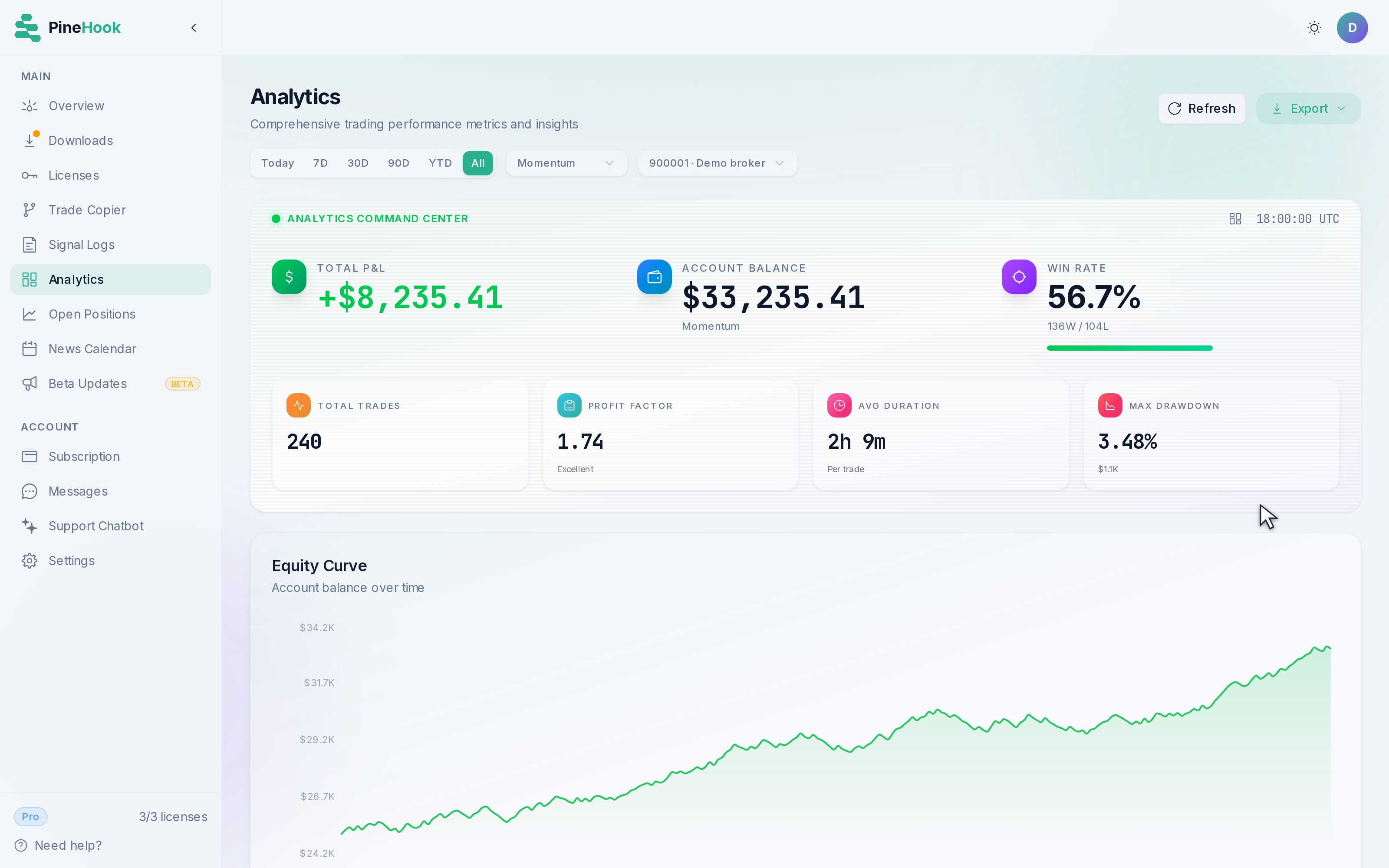
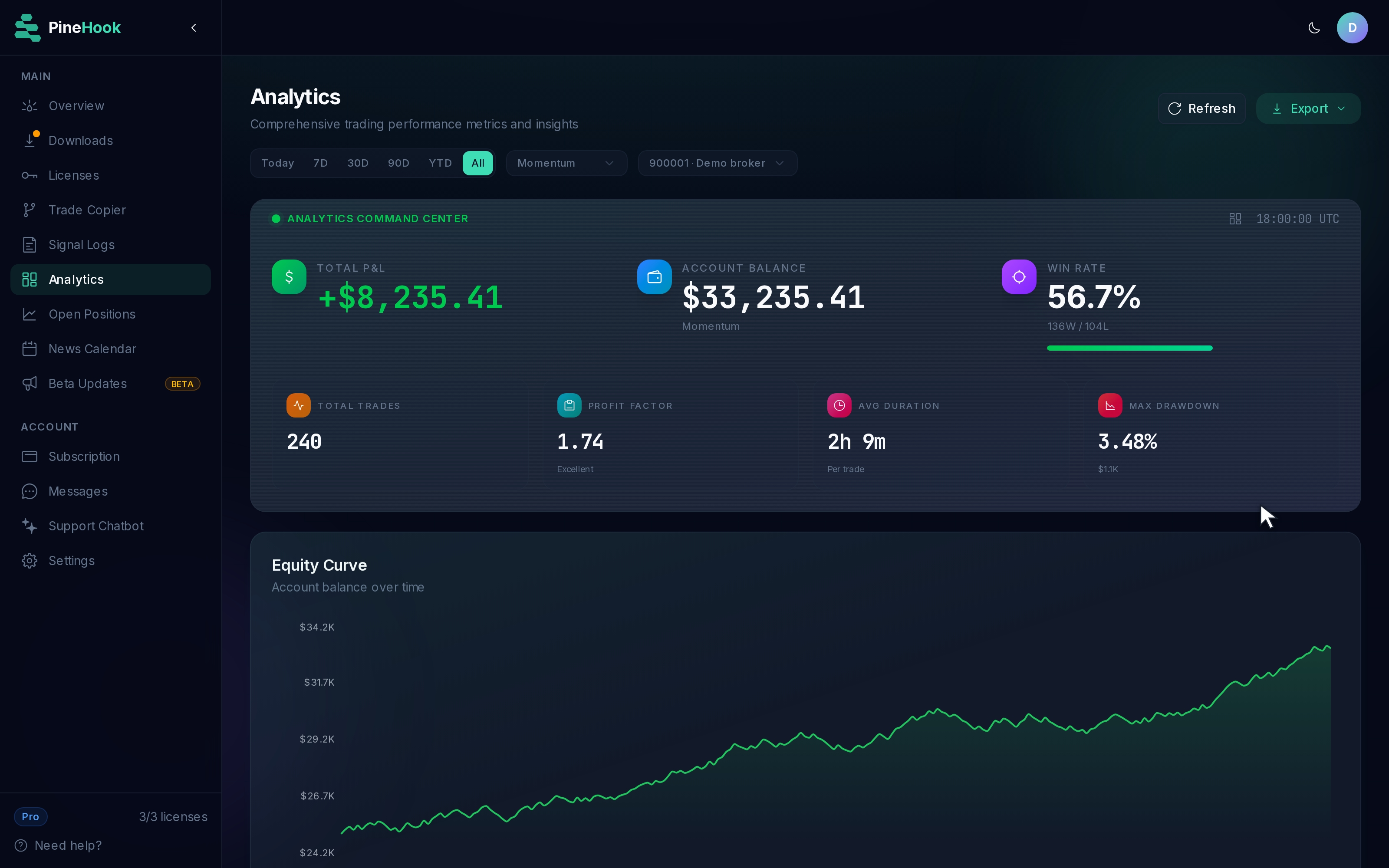
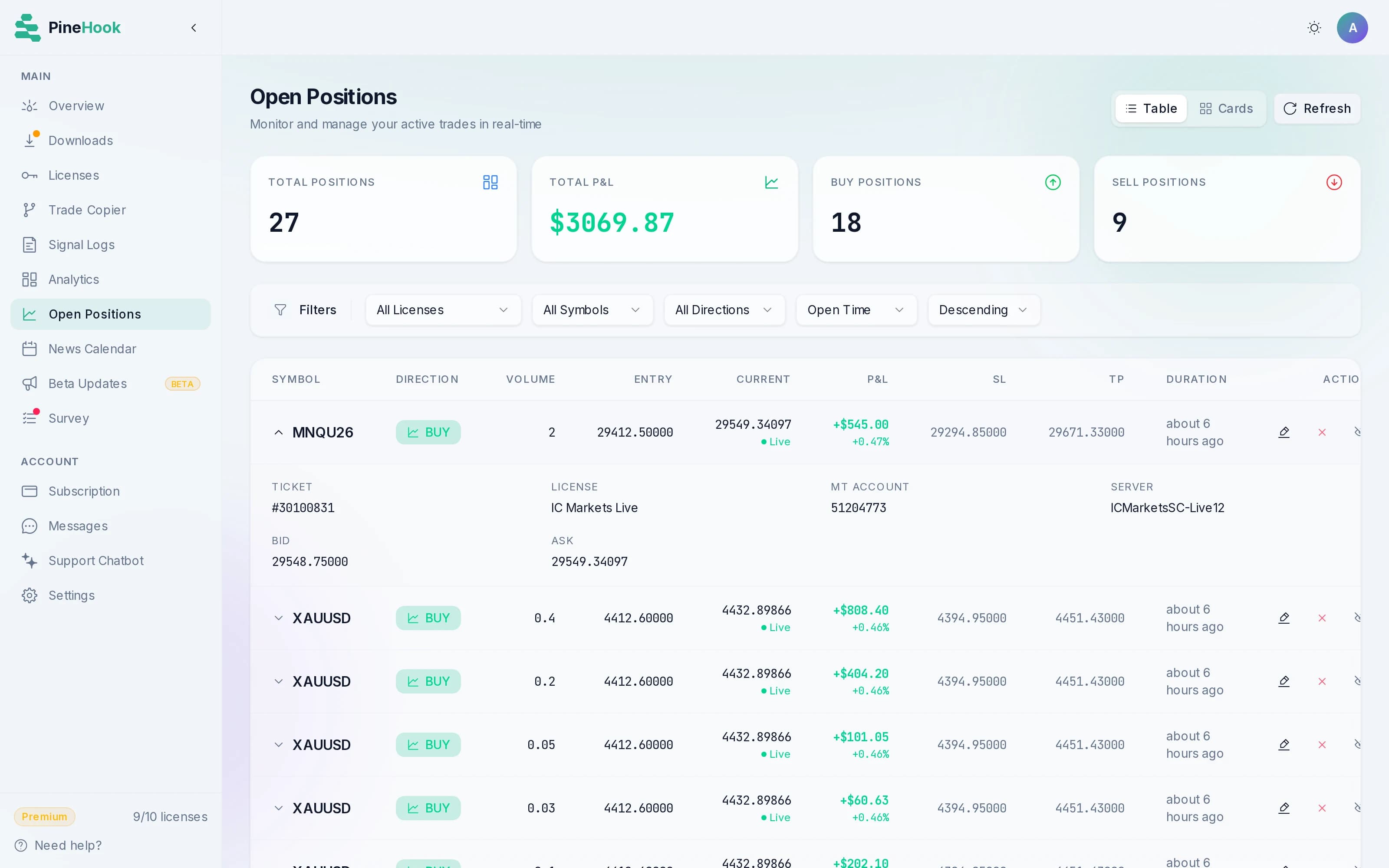
The dashboard is your control room for everything after that: watch open positions live, adjust targets and stops on the go, and tune your EA's settings from the browser instead of the terminal.
How TradingView to MT5 Automation Works
Get up and running in minutes. No complex setup required.
Buy with stop loss and take profit in pips
A1B2-C3D4-E5F6-7890,buy,EURUSD,size_lots=0.1,sl_pips=50,tp_pips=100Buy limit at a specific price with exact SL and TP levels
A1B2-C3D4-E5F6-7890,buylimit,EURUSD,price=1.0800,size_lots=0.1,sl_price=1.0750,tp_price=1.0900Close all long positions on a symbol
A1B2-C3D4-E5F6-7890,closelong,EURUSDBuy with SL and TP in JSON format
{
"license": "A1B2-C3D4-E5F6-7890",
"action": "buy",
"symbol": "EURUSD",
"size_lots": 0.1,
"sl_pips": 50,
"tp_pips": 100
}Both CSV and JSON formats supported. See the alert command reference or the full parameter list.
TradingView to MT5 automation, feature by feature
Speed, reliability, and full visibility into every alert. No black boxes.
Alert Delivery, Measured
WebSocket connections rather than HTTP polling, so median delivery latency sits under 25ms, with the real last-7-day numbers published daily on the status page. Every stage of the trip is timed separately, which shows where the milliseconds went. The docs explain exactly what we measure.
Uptime You Can Verify
Redundant relay servers with automatic failover: if one becomes unreachable, your EA reconnects to a healthy node near-instantly, and in-flight alerts are preserved and delivered under your recovery settings. The record behind the number is public on the status page.
Multi-Account Support
Run the same strategy across different brokers and prop firms. Standard gives you 1 license, Pro 3, Premium 10, each connecting to a separate MT5 account. On a hedging broker, several strategies can share one symbol. Tier reference.
Broker Symbol Mapping
Brokers rarely agree on instrument names. The same pair can be EURUSD.micro at one and i.EURUSD at another, and the Dow might be DJ30 instead of US30. Set a prefix, a suffix or an explicit rename once, and alerts keep using TradingView's names everywhere. Configured per license, so each account follows its own broker's spelling. Symbol mapping guide.
Detailed Signal Logs
Every alert logged with timestamps, the raw message and its delivery status, and every delivery is acknowledged back by your EA, so a delivered row means confirmed receipt rather than a hopeful send. A malformed webhook is highlighted in red with an explanation of what went wrong, and you can fire test messages before scheduling anything on TradingView. Signal log guide.
Complete Control on the Go
Run the whole day from the web dashboard, without touching an MT5 terminal or hand-sending alerts. Watch open positions, close them, or move stops and targets. Adjust EA settings, guardrails, and symbol filters on the fly, and dig into your analytics in the same place. Dashboard guide.
Support That Knows the Product
We built our own privacy-focused chatbot, so it knows the system and can reach your account data to troubleshoot on the spot. No contracted support reading from a decision tree, and nothing stored with third parties. Escalate to a human whenever you want one.
Signal logs, analytics, and open positions in one dashboard
Click through the screens you'll be working in every day.
Every alert logged with its full latency breakdown. Delivery, execution, transport and broker fill stay separate, which shows exactly where the time went, and which parts are ours. Reading the signal log.
Multi take profit, trailing stops, and breakeven from one alert
You write the exit plan into the alert itself. When it fires, your EA runs it from entry to close without anyone watching the chart.
Split one entry across up to ten take profits
Each level closes a slice, by percentage of the original volume or by exact lots. Your broker holds a safety stop and target at the deepest levels, so the position stays protected even if the EA stops responding.
LICENSE,buy,EURUSD,size_lots=10,tp1_pips=30,tp1_lots=5,tp2_pips=60,tp2_lots=3,tp3_pips=100,tp3_lots=2,sl_pips=25Of 10 lots: 5 close at +30 pips, 3 at +60, and the last 2 at +100.
Trail the stop the way the strategy wants
Follow price by a fixed pip distance, a percentage of the entry price, or an ATR multiple that widens when volatility picks up. The stop moves forward and never back, and an optional trigger holds it off until the trade is in profit.
LICENSE,buy,EURUSD,size_lots=0.1,distance_pips=20,trail_step=5Trail 20 pips behind price, moving the stop in 5-pip steps.
Move to breakeven and leave it alone
Set a trigger distance and the EA moves your stop to entry once price travels that far in your favor, with an optional buffer to lock in a few pips. It fires once, then removes itself. Run it alongside a trailing stop and whichever fires first removes the other.
LICENSE,buy,EURUSD,size_lots=0.1,sl_pips=50,tp_pips=100,be_trigger_pips=30,be_offset_pips=5At +30 pips, move the stop to entry plus 5 pips.
Or step in by hand from the open positions screen.
Risk guardrails, enforced on your terminal
You decide the guardrails, all of them optional, and the EA enforces them locally. Cloud-side risk tools stop working when the connection does; these keep watching your account either way. Built for funded accounts at FTMO, FundedNext, The5ers, and any MT5 prop firm.
Drawdown limits
Two limits, run together the way prop firms enforce them. A daily loss cap that resets each day, and an overall drawdown cap measured however your firm measures it: trailing behind your highest equity or your highest closed balance, static, or a percentage of your best account value. Set either or both. The EA blocks new entries the moment one is breached, or closes everything if you prefer. The check runs every second on your own terminal, includes floating P&L, and keeps working even if your connection drops. Raising a limit mid-session will not unblock trading, so the safety net cannot be overridden during a losing streak.
Max daily loss: 3%
Max overall drawdown: 6%
Mode: Trailing (floating)
On breach: close and blockEverything closes if the day drops 3%, or if equity ever sits 6% below your highest account value. Either one, whichever comes first.
Active trading hours
Block new entries outside your session, and optionally close every position and pending order when it ends. Exits and trade management always run regardless of the clock, so you can leave a session without stranding an open position.
Active hours: 08:00 to 17:00 UTC
Close outside hours: onEntries only fire during the session, and everything is flat by one second past five.
Spread caps
Skip entries when the spread is wider than your limit, set in pips or as a percentage of price. A news spike or a thin session stops filling you at the worst possible price, and each alert can carry its own override for instruments that trade wider.
Max spread: 1.5 pipsAn alert arriving while the spread is blown out is rejected instead of filled badly.
Position caps
Cap exposure per symbol and per strategy, in lots or as a percentage of equity, with separate long and short limits. You choose whether an oversized alert is rejected outright or capped down to the limit and executed at the reduced size.
Max long per symbol: 2 lots
Oversized alerts: cap to limitA 5-lot alert on a 2-lot cap opens 2 lots, or nothing at all, whichever you chose.
Running these on a funded account? See which prop firms allow an EA and how the limits map onto their rules.
Alerts are queued, never dropped
If your EA, VPS, or internet disconnects briefly, alerts don't just disappear. They wait. When you reconnect, you choose what happens next, and both modes are set in the EA configuration.
Closures Only
Missed close alerts execute automatically to protect your open positions. Missed entry alerts are shown as notifications only. This prevents stuck positions from accumulating losses while you're disconnected.
Recommended default. Protects your capital without opening unexpected positions.
Expiry window
Set a window from 5 minutes to 1 hour, with 15 minutes as the default. Alerts older than your window are marked stale and skipped, so nothing ancient fires unexpectedly.
Privacy and security, by design
Financial data deserves the highest level of protection, and we built the system with that principle at the foundation rather than bolting it on later. Registered in Montreal, PineHook answers to the three regimes below, which makes the protection statutory rather than a matter of our word.
PineHook Systems Inc., Montreal, Quebec
PIPEDA
Canada's federal privacy law
Law 25
Quebec's privacy act
GDPR
EU's data protection regulation
Encrypted end-to-end
TLS encryption on every connection. Alerts, credentials and account data are encrypted in transit and at rest, with no exceptions. Two optional credentials sit on top of that: a secret key and a signal authentication password, documented alongside how each one fails.
We take your data seriously
We collect the bare minimum the service needs, use it to run the service, and nothing else. Nothing is sold or shared. We proudly abide by some of the strictest privacy regulations in the world, because when a service handles your trading activity, anything less should be a dealbreaker.
Full transparency
Every alert logged with precise delivery and execution latencies. Any downtime is logged publicly on our status page with real-time updates on what happened and when it's resolved. You always know exactly what's going on.
Transparent data policy
Our privacy policy spells out exactly what we collect, why, and how we process it. Written in plain language, not legal fog. We publish it because we have nothing to hide.
Verified EA downloads
Prove the file you install is the file we published. Every release carries a SHA-256 fingerprint on our public GitHub, independent of pinehook.io, and your Downloads page checks it at load time. How to verify your download.
No broker credentials, ever
The EA runs on your own MT5 terminal and places orders locally, so your broker login never leaves your machine. All we hold is a license key that routes alerts. Cloud-API copiers keep broker logins on their servers, where a breach exposes the account. There is nothing like that to breach here. How the architecture works.
Built for MT5 brokers and prop firms
If your platform runs MetaTrader 5 and allows Expert Advisors, PineHook works with it. Most major prop firms do, including FTMO, FundedNext, and The5ers, and the compatibility table links each firm's own rule.
All broker and prop firm names are trademarks of their respective owners. A listing here means PineHook works with that platform's MetaTrader 5 accounts. It does not imply any partnership, sponsorship, or endorsement.
Any
MT5 broker that allows EAs
Plug and play
Quick and simple setup
0
Broker restriction
Questions about how the features work
The mechanics behind the trade management, in more detail than the feature cards allow.
How many take profit levels can one position have?⌄
Up to ten take profit levels and ten stop loss levels per position. Each level closes a slice, sized either as a percentage of the original volume or as fixed lots, though the two modes cannot be mixed on the same side. The EA watches price tick by tick and executes each partial close, while the broker holds a safety stop and target pinned to your deepest levels so the position is never unprotected if the EA stops responding. Every tier gets all ten levels, including the trial. Multi-TP and SL reference.
What happens to my take profit ladder if I add to the position?⌄
Percentage levels re-scale on their own. When the position grows or shrinks, whether from a manual add, a partial close, or a change that happened while the EA was offline, the levels that have not fired yet are re-split across the new remaining volume by their relative percentages. Levels that already fired stay exactly as they were. Fixed lot levels are the exception, because they keep their literal volumes and are only re-checked against the new position size. How re-splitting works.
Can I trail my stop from a TradingView alert?⌄
Yes, in three different ways. A trailing stop can follow price by a fixed number of pips, by a percentage of the entry price, or by a multiple of ATR that recalculates every tick, so the distance widens when volatility picks up and tightens when it settles. The stop moves forward and never back. A step size is optional and keeps the EA from flooding your broker with modification requests, which does mean the stop sits within one step of your configured distance rather than exactly on it. Trailing stop reference.
How does automatic breakeven work?⌄
You set a trigger distance on the alert that opens the trade. Once price has traveled that far in your favor, the EA moves the stop to your entry price, with an optional buffer on either side of it. It fires once and then removes itself. If a trailing stop is running on the same position, whichever one fires first removes the other, so the two never fight over the same stop level. Auto-breakeven reference.
Can I close part of a position from a webhook?⌄
Yes. A take profit ladder does it automatically at each level it reaches, and you can also scale out on demand: closelong and closeshort accept either a percentage of the original entry volume or an exact lot amount, filtered by symbol and, in Multi-Strategy mode, by magic number. Because the percentage is measured against the original entry rather than what is left, two identical fifty percent closes exit the whole position. Close command reference.
How do I know an alert actually executed?⌄
Because your EA says so, not us. After executing the trade on MT5, the EA sends an acknowledgment back with the result, so an alert only shows as executed in the dashboard once your own terminal has confirmed it. Each row breaks the trip into separately timed stages, covering delivery, execution, and broker fill, and a failed execution records the broker's error message instead of a green checkmark. Alerts that never reached your EA stay visibly queued or expired, never silently dropped. Signal log guide.
Can PineHook enforce prop firm drawdown rules?⌄
Yes, and both of the rules at once. Most firms enforce a daily loss and a maximum drawdown together, so PineHook runs two independent limits: set your firm's daily figure and your firm's overall figure, as a percentage or as a cash amount, and whichever you reach first blocks the account. For the overall one you choose how it is measured: trailing behind your highest equity, trailing behind your highest closed balance, a static floor, or a percentage of your best account value. The EA blocks new entries the moment either is breached, floating losses included, or closes everything if you configure it that way. The check runs every second on your own terminal, so it keeps working even if your connection to us drops. A daily block lifts at the reset hour you chose; an overall block in the trailing, static and relative modes holds until you change the drawdown settings. Raising a limit mid-session will not unblock it, which stops the safety net from being overridden during a losing streak. Active hours, spread caps, and per-symbol position caps work the same way: you set them, the EA enforces them locally. Risk management reference.
What is the difference between the two missed-alert recovery modes?⌄
Closures Only is the default, and it is the one we recommend, because a position left stuck open costs more than an entry you did not take. Missed close alerts execute when the EA reconnects, and missed entries arrive as notifications you can act on or ignore. Notify Only does what the name says and executes nothing at all. Either way, an alert older than your expiry window is skipped rather than replayed, and that window runs from five minutes to an hour with fifteen minutes as the default. EA configuration guide.
Does PineHook ever need my MT5 broker password?⌄
No, and the architecture is the reason. The Expert Advisor runs on your own terminal and opens an outbound connection to us, so orders are placed locally with credentials that never leave your machine. What we hold is a license key that routes alerts to that connection. Two optional passwords sit on top of it: a secret key the EA presents when it connects, and a signal authentication password that every webhook has to carry before we accept it. Signal authentication and secret keys.
Can two strategies trade the same symbol at once?⌄
On a hedging account, yes. Switch the EA to Multi-Strategy mode and tag each alert with its own magic number, and the EA keeps the positions separate for closes and modifications. One license covers this, so a second strategy does not mean a second subscription. Netting and exchange accounts cannot do it, because the broker merges all trades on a symbol into one net position. How many strategies you can run per symbol depends on your plan, and the account types guide explains magic numbers in full.
Does PineHook support pending orders?⌄
Yes. Buy and sell limits, buy and sell stops, and a pair of commands that resolve to limit or stop based on where price sits when the EA receives them, which helps when a strategy fires off historical bar data. Pending orders are good till cancelled by default, and an expiry can be attached in seconds or as an exact UTC time. Stops, targets, ladders and trailing all attach at fill rather than while the order waits. Order placement reference.
Coming from another relay? See how PineHook compares on latency, recovery and data handling.
Get Started Quickly
Three steps. That's it.
Create Account
Sign up for free and get your unique license key from the dashboard.
Install EA
Download and install our Expert Advisor on your MT5 terminal.
Setup Alerts
Configure TradingView alerts with your license key and start trading.
Or start with the prerequisites if you have not set up an MT5 terminal yet.
Ready to see it in action?
Set up your first automated trade in under 10 minutes. Free for the whole beta, on a live or demo account.